
AI image upscaling
AI Upscale enlarges photos up to 16× and adds real detail with an on-device super-resolution model, so they stay sharp instead of going soft. More about AI Upscale
Convert photos to 27 formats, edit or strip their metadata, and tidy them up with on-device AI. One app for iPhone, iPhone Duo, iPad and Mac. No account, and your photos are never uploaded.
Available now on the App Store for iPhone, iPhone Duo, iPad and Mac.
Version 1.1 is now available on iPhone and iPad, with the Mac update to follow. It adds 14 new tools, including AI Upscale, hiding faces and number plates, restoring old photos and turning Live Photos into GIFs, along with a cleaner, faster design. Features marked “New in 1.1” arrive with that update.
Save to 27 formats, from HEIC to JPG, WebP and PDF, through to animated PNG, MP4 video and game textures. Open 33 formats plus Camera RAW from 16 camera makers. Any format your device can’t write is hidden, so the menu only shows what works.
Conversion, metadata, AI clean-up and the small jobs in between. Everything runs on your iPhone, iPhone Duo, iPad or Mac.
AI Upscale enlarges photos up to 16× and adds real detail with an on-device super-resolution model, so they stay sharp instead of going soft. More about AI Upscale
JPEG, PNG, HEIC, WebP, JPEG XL, AVIF, animated GIF and PNG, TIFF, PDF, PSD, game and 3D textures, and MP4 or QuickTime video, in one grouped menu. Quality, lossless and colour options for each format, with an estimated file size or a target size in KB or MB.
33 formats, including SVG, animated HEIC, Radiance HDR, DICOM and multi-page PDFs, plus Camera RAW from 16 camera makers and DNG.
Queue one photo, hundreds, or whole folders. Set format, size and file names once in Batch Setup, override any single file, and see a clear error for any file that fails.
Title, caption, keywords, rating, copyright, creator, date taken with time zone, and camera details. Set a location from search, a map pin or your current position, then review every change before export.
Remove backgrounds, Auto Enhance, straighten the horizon, fix red-eye, reduce noise, sharpen, and standard upscaling at 2× or 4×. AI Studio shows a before-and-after compare slider.
Cut out the subject with on-device AI. Crop to the subject, keep it transparent, or fill the background with a colour.
Add or fix a location by searching for a place or dropping a pin on the map, see place names from GPS, or remove the location completely.
Save to Photos or Files, or share, in one step. Add XMP and JSON sidecars, a CSV report for the batch, or a ZIP of the whole export.
Paint over an unwanted object in AI Studio and it is filled in from the surroundings.
Typed text or your own logo, in 9 positions or tiled across the photo. Opacity, margin, rotation and spacing, with a live preview, for one photo or a whole batch.
14 presets for Instagram, TikTok, YouTube, X, Facebook, LinkedIn, Pinterest and more, plus standard ratios and custom sizes. On-device subject and face detection keeps the important part in frame.
One combined PDF or one per photo, with page size, orientation, margins, placement, page colour and compression. A text layer makes the PDF searchable, and it is on by default.
Recognise text in one photo or many, then edit it, copy it or save it as a text file.
Spots exact copies, near duplicates and similar shots, keeps the highest-resolution or sharpest copy, and removes the rest from the queue. On Mac it can also move them to the Bin.
Tokens for name, number, date taken, time, size, camera, city and extension, plus find and replace and letter case. Name conflicts are flagged before you export.
Twelve built-in presets, from Web-Safe Export to Deep Privacy Scrub, and your own. Sync Across Devices keeps settings, presets and rename rules in step through your own iCloud.
Icon Studio on Mac makes .icns, .iconset, .ico and PNG icons in the macOS shape, copies the icon off any file or folder, and applies or removes folder icons. Icon size kits on iPhone and iPad.
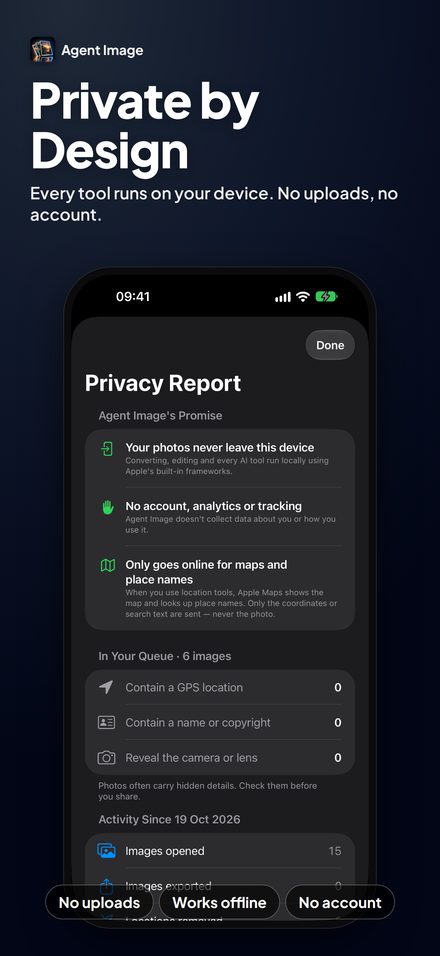
See which photos in your queue carry GPS, names or camera details, remove location from everything in one tap, and check the on-device activity counts.
Agent Image runs natively on iPhone Duo and puts the extra screen to work. Unfolded, your queue sits beside the photo you’re working on. Half-folded, the tools and the queue each get their own side. Folded, every tool is still there on the outer screen.
The large inner screen shows the queue beside the selected image’s details, or beside the batch, so you can check metadata and output settings without leaving the list.
Stand it up in landscape and the layout splits at the fold: the tool or image on the left, the queue on the right. Batch Setup, Convert and AI Studio stay in the tool side.
Close it and Agent Image keeps working on the outer screen, with every tool. At the largest text sizes, the inner screen switches to one wide column so nothing is cut off.
Version 1.1 adds 14 new tools to Agent Image on iPhone, iPad and Mac. Like everything else in the app, they run on your device and never upload your photos.
Passport and ID photo rules change, so check the current requirements for your document. The issuing office decides whether a photo is accepted. Hide private details can miss small or partly hidden faces and plates, so check the preview before you share.
New in 1.1
AI Upscale enlarges photos and adds real detail with an on-device super-resolution model, so they stay sharp instead of going soft. It runs on the Neural Engine in your iPhone, iPad or Mac, works offline, and never uploads your photos.
You’ll find AI Upscale under AI Tools › Upscale in AI Studio, Batch Setup and the Export window, on iPhone, iPad and Mac. The largest output is 16,384 pixels on the longest edge, about 268 megapixels on Mac and 100 megapixels on iPhone and iPad, and it never makes a photo smaller. Standard upscaling at 2× or 4× is still available. AI Upscale uses the open-source Real-ESRGAN model (BSD 3-Clause licence, © 2021 Xintao Wang).
The export menu is grouped so the right format is easy to find, and it hides any format your device can’t write.
| Everyday | JPEG, PNG, animated PNG, HEIC, GIF |
|---|---|
| Web | AVIF, WebP, JPEG XL |
| Professional & Print | TIFF, JPEG 2000, PSD, BMP, QOI, Netpbm |
| Documents | |
| Icons | ICO, ICNS |
| Games, 3D & VFX | OpenEXR, TGA, DDS, KTX, KTX2, ASTC, PVR, ATX |
| Video | MP4, QuickTime |
Everything you can save except video, plus SVG, animated HEIC, cursors, Radiance HDR, MPO 3D photos, SGI, PICT and DICOM. Multi-page PDFs open with each page as its own item.
Camera RAW from Canon, Nikon, Sony, Fujifilm, Olympus/OM System, Panasonic, Pentax, Samsung, Leica, Hasselblad, Phase One, Leaf, Konica Minolta, Epson and Kodak, plus DNG.
WebP and JPEG XL can be saved as well as opened, including animated WebP. Available now on iPhone, iPad and Mac.
The full list of what Agent Image 1.0.2 can open and save. It saves to 27 formats, including MP4 and QuickTime video, plus .iconset folders on Mac. It opens 33 formats plus Camera RAW from 16 camera makers. The export menu hides any format your device can’t write.
Swipe the table sideways to see every column.
| Group | Format | File extensions | Open | Save | Options and notes |
|---|---|---|---|---|---|
| Everyday | JPEG | .jpg, .jpeg, .jpe, .jfif | Yes | Yes | Quality, progressive, embedded thumbnail, keep HDR gain map |
| Everyday | PNG | .png | Yes | Yes | Interlaced |
| Everyday | Animated PNG | .png, .apng | Yes | Yes | Keep animation, combine images, frame time, loop |
| Everyday | HEIC / HEIF | .heic, .heif, .hif | Yes | Yes | Saves as .heic. Quality, lossless, keep HDR |
| Everyday | GIF | .gif | Yes | Yes | Still or animated. Keep animation, combine images, frame time, loop |
| Everyday | HEICS (animated HEIC) | .heics | Yes | No | Open only. Apple’s HEICS writer makes files its own player rejects, so it isn’t offered for export |
| Web | AVIF | .avif | Yes | Yes | Quality, lossless |
| Web | WebP | .webp | Yes | Yes | Still or animated. Quality, lossless, keep animation, combine images |
| Web | JPEG XL | .jxl | Yes | Yes | Quality, lossless, effort 1–9 |
| Web | SVG | .svg | Yes | No | Open only. Opened as a transparent PNG working copy |
| Professional & Print | TIFF | .tif, .tiff | Yes | Yes | Compression: none, LZW or PackBits. Multi-page TIFF |
| Professional & Print | JPEG 2000 | .jp2, .j2k, .jpf, .jpx | Yes | Yes | Saves as .jp2. Quality, lossless |
| Professional & Print | PSD (Photoshop) | .psd | Yes | Yes | — |
| Professional & Print | BMP | .bmp, .dib | Yes | Yes | — |
| Professional & Print | QOI | .qoi | Yes | Yes | Lossless |
| Professional & Print | Netpbm | .pbm, .pgm, .ppm, .pnm | Yes | Yes | Saves as .pbm |
| Professional & Print | PICT | .pict, .pct, .pic | Yes | No | Open only |
| Professional & Print | SGI | .sgi, .rgb, .rgba, .bw | Yes | No | Open only |
| Professional & Print | MPO (3D photos) | .mpo | Yes | No | Open only |
| Professional & Print | DICOM | .dcm, .dicom | Yes | No | Open only |
| Documents | Yes | Yes | Each page opens as its own item, or only the first page (Settings › Importing). Saves with page size, orientation, margins, placement, page colour, compression, combine into one PDF, searchable text | ||
| Icons | ICO | .ico | Yes | Yes | Icon sizes, shape, fit, padding, background, shadow |
| Icons | ICNS | .icns | Yes | Yes | Icon sizes, shape, fit, padding, background, shadow |
| Icons | Icon set | .iconset folder | No | Yes | Save only, on Mac, from the ICNS options |
| Icons | Cursor | .cur | Yes | No | Open only |
| Games, 3D & VFX | OpenEXR | .exr | Yes | Yes | — |
| Games, 3D & VFX | TGA | .tga | Yes | Yes | — |
| Games, 3D & VFX | DDS | .dds | Yes | Yes | Uncompressed 32-bit |
| Games, 3D & VFX | KTX | .ktx | Yes | Yes | — |
| Games, 3D & VFX | KTX2 | .ktx2 | Yes | Yes | — |
| Games, 3D & VFX | ASTC | .astc | Yes | Yes | — |
| Games, 3D & VFX | PVR | .pvr | Yes | Yes | Square, power-of-two sizes |
| Games, 3D & VFX | ATX | .atx | Yes | Yes | — |
| Games, 3D & VFX | Radiance HDR | .hdr | Yes | No | Open only |
| Video | MP4 | .mp4 | No | Yes | Save only. An animation becomes a video and several images become a slideshow. H.264 or HEVC, frame time |
| Video | QuickTime | .mov | No | Yes | Save only. An animation becomes a video and several images become a slideshow. H.264 or HEVC, frame time |
| Camera maker | File extensions | Open | Save |
|---|---|---|---|
| Adobe DNG (any camera) | .dng | Yes | No |
| Canon | .cr2, .cr3, .crw | Yes | No |
| Nikon | .nef, .nrw | Yes | No |
| Sony | .arw, .srf, .sr2 | Yes | No |
| Fujifilm | .raf | Yes | No |
| Olympus / OM System | .orf | Yes | No |
| Panasonic | .rw2, .raw | Yes | No |
| Pentax | .pef, .ptx | Yes | No |
| Samsung | .srw | Yes | No |
| Leica | .rwl, .dng | Yes | No |
| Hasselblad | .3fr, .fff | Yes | No |
| Phase One | .iiq | Yes | No |
| Leaf | .mos | Yes | No |
| Konica Minolta | .mrw | Yes | No |
| Epson | .erf | Yes | No |
| Kodak | .dcr, .kdc | Yes | No |
Camera RAW files open through Apple’s built-in RAW engine, so which camera models are supported depends on your iOS, iPadOS or macOS version. Save RAW files to any of the formats above.
Colour space, 8-bit or 16-bit where the format allows, DPI and transparency fill. Agent Image shows an estimated file size, and you can set a target size in KB or MB.
Save XMP sidecars or JSON metadata sidecars alongside your photos, create a CSV metadata report, and package an export as a ZIP file. Tools › Import Metadata from CSV applies metadata from a spreadsheet.
Not supported: JPEG XR.
Agent Image 1.0.2 on iPhone, iPad and Mac. Select any screenshot to view it larger.
These screenshots show version 1.0.2. Available now on iPhone, iPad and Mac. The sample photos and text are illustrations.
A stacked layout on iPhone, two columns on iPad that work with Split View, Slide Over and Stage Manager, and a sidebar and queue on Mac. On Mac, the Tools menu puts everything a keystroke away. On iPhone and iPad, the same tools sit in the More menu.
Privacy
Every conversion, edit and AI tool runs on your iPhone, iPad or Mac. There is no account and no analytics, and Agent Image never uploads your photos. It only goes online for map tiles and place names, and for iCloud sync if you turn it on.
Out now on the App Store. One download for iPhone, iPad and Mac.